This Tuesday we are happy to let you know that you have access to Adobe Express! Like Canva, Adobe Express is a fabulous creative program and it is free for educators.   Adobe Express is fantastic for multimedia projects. It’s user-friendly, integrates well with other Adobe products, and is great for storytelling, especially with videos. I love the AI generated images you can create in it!
One of the biggest differences between Adobe Express and Canva is that Adobe Express has slightly more advanced features and may suit those with some design knowledge. Canva, on the other hand, offers plenty more premade templates and is more beginner and user-friendly.
How to get into Adobe Express:
​1. Go to Adobe Express in a web browser: https://www.adobe.com/express/
2.  Click on Sign in in the top right.
3. Click on Continue with email and type in your school district email.
4.  If it asks if it is for a Personal Account or Company or School Account, choose Company or School Account.  At this point when you are at work it should take you straight in.
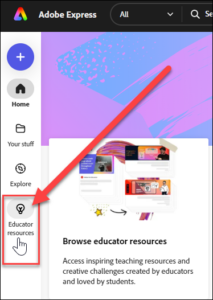
If you are not familiar with Adobe Express, I recommend that you click on Educator Resources on the left. There are lots of great videos, lesson plans, templates and more to help you get started.
NOTE: If you have trouble getting in in Google Chrome, try the Edge Browser or Firefox.

​​Last week I had the awesome opportunity to listen to two fabulous Coquitlam School District teachers take us through the Minecraft world they designed with Microsoft, and of course, I couldn’t wait to share it with you! In “A Pacific Northwest Coastal Experience” students travel back in time to visit a ​ kʷikʷəƛəm​ village. Here they meet the Elders in the Big House and learn to harvest cedar planks, salmon, salmonberries and camas bulbs. Visitors get to go and try all these tasks out and learn more about the Indigenous ways of knowing and being.  It is truly amazing to be in Minecraft walking the woods that we know with the animals that we see every day! It is a fabulous world to explore and I recommend taking your classes through it.  There is also an easy to follow teacher guide with great lessons for you to follow on your journey with lesson extensions.   If you would like a hand with these lessons please let me know-I love teaching with Minecraft and am happy to help out!

Click here or on the picture to go to the instructions for this world on the Minecraft Education page.

Click here or on the picture to get the Educator Guide

If you liked this one, you might also love the Manito Ahbee Aki World designed by the Indigenous people of Manitoba and Microsoft:

Click here or on the picture to go to the Manito Ahbee Aki instructions on Minecraft Education.​

Just a reminder that if you have any problems with your computer, printer, laptop or other techie equipment, you can email ITHelpdesk@sd71.bc.ca or put the ticket in yourself which is much faster: open this link in your browser- https://ithelpdesk.sd71.bc.ca/  login using your district email address and password, then simply fill out the request form as detailed as you can.​