
Tech Tips
  • Home
  • Learn More
  • Menu Menu
Tech Tips

Touch Pad Tips

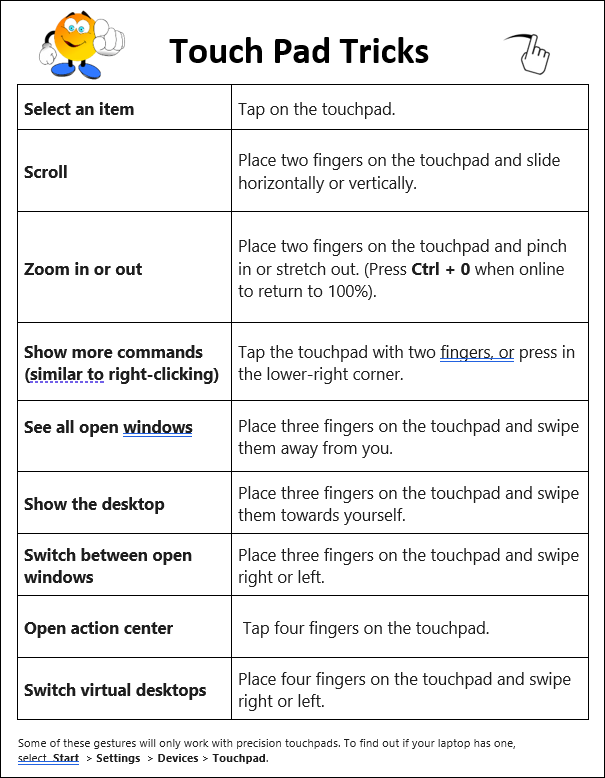
​Welcome back​​​​ and all the best to you all in the new year! Am I the only one​​ out there who struggles with using the touch pad on my laptop? I don’t know how many times I have accidentally used two fingers and enlarged my screen so much that I can’t read it (you can press Ctrl +0 to make it go back to 100% if you are online).  Here are some touch pad tips that might help you when you don’t have a mouse. These can also be handy for our students who often don’t have access to a mouse. Please read on for touch pad tricks and some learning opportunities for those interested in learning more about Brightspace.
July 9, 2026/by admin
Share this entry
  • Share on Facebook
  • Share on X
  • Share on Pinterest
  • Share on LinkedIn
  • Share on Tumblr
  • Share on Vk
  • Share on Reddit
  • Share by Mail
https://learn71.ca/tech-tips/wp-content/uploads/sites/42/2026/07/Tech-Tips-Logo.png 0 0 admin https://learn71.ca/tech-tips/wp-content/uploads/sites/42/2026/07/Tech-Tips-Logo.png admin2026-07-09 09:52:362026-07-09 09:52:36Touch Pad Tips

Archive

  • July 2026
  • August 2024

Categories

  • Tech Tips

Facebook

Instagram

No images available at the moment

Follow Me!

Footer

Footer 2

Link to: Express Yourself with Adobe Express Link to: Express Yourself with Adobe Express Express Yourself with Adobe Express Link to: Descriptive Feedback for Learning Updates (Report Cards) Link to: Descriptive Feedback for Learning Updates (Report Cards) Descriptive Feedback for Learning Updates (Report Cards)
Scroll to top Scroll to top Scroll to top