Today I can’t resist sharing the history game I found. History buffs and history teachers will love timeguessr.com where you are given a picture, and you try to guess the location and year it was taken.
Jane Rondow, our wonderful SD 71 District Inclusion Teacher (Assistive Technology), has written this week’s text tip on how to change your cursor and the size of your mouse pointer.
Are you using your computer to present, show people how to do things, point out things on websites, do an online meeting or make a how-to video? Draw attention to the things you are showing by enlarging your mouse cursor. This can also be helpful for people with visual Impairments, processing needs or anyone really.
Windows Computer :
1. Tap the Windows key
2. Type “Ease of Access Settings” select this menu option.
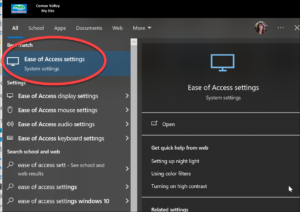
3. Select Mouse Pointer from the menu on the left.
4. Slide the change pointer size slider to the right to make it bigger, to the left to make it smaller.
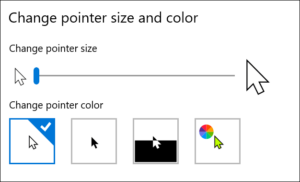
5. Select the pointer colour and contrast
6. If you select the far-right colourful option, you can choose any colour, + Pick a custom pointer colour
*Selecting a High Contrast option like yellow (with a black outline) or black makes the cursor easier for people with low vision needs to see the cursor. Doing small circles with the cursor around or near the area you would like people to focus on helps to gain attention to that area.
LINK Windows Make your Mouse, Keyboard or Other Input Devices Easier to Use
LINK Mac Computer Make the Pointer Easier to see on a Mac
Happy password changing day. For this Tuesday’s tech tip, let’s dive into using Outlook Tasks to help you keep track of your to-do list. Outlook Tasks is a powerful tool that lets you to organize your to-do lists, set deadlines, and prioritize daily tasks efficiently. This simple organization trick can significantly enhance your productivity and ensure nothing slips through the cracks. I personally am going to try using this instead of my paper to do list which I have all over the place!
Here is a short video that explains it super well
…and you can click here for more instructions for using Tasks.
The use of AI is rapidly increasing in the world and in our schools. We value your insights and experiences, and invite you to share them with us by filling out this brief survey:
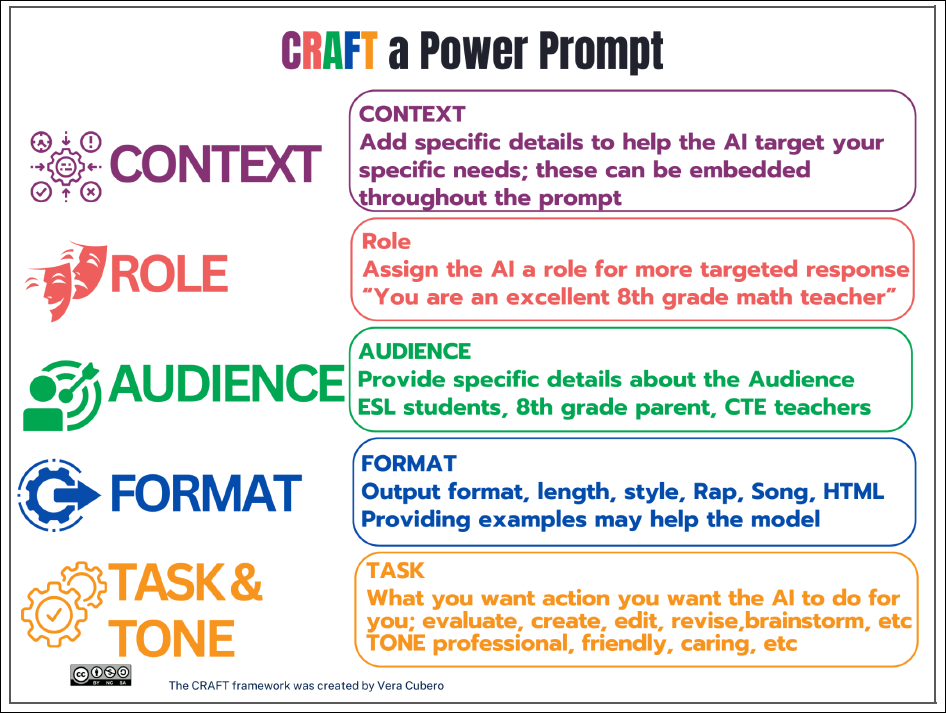
Creating engaging and effective prompts for ChatGPT/Bing Copilot can be challenging but once you figure it out you can make your job a lot easier! Here are some tips that we found recently for crafting prompts that will help you get meaningful responses from ChatGPT/Copilot: