
Express Yourself with Adobe Express
This Tuesday we are happy to let you know that you have access to Adobe Express! Like Canva, Adobe Express is a fabulous creative program and it is free for educators. Adobe Express is fantastic for multimedia projects. It’s user-friendly, integrates well with other Adobe products, and is great for storytelling, especially with videos. I love the AI generated images you can create in it!
One of the biggest differences between Adobe Express and Canva is that Adobe Express has slightly more advanced features and may suit those with some design knowledge. Canva, on the other hand, offers plenty more premade templates and is more beginner and user-friendly.
How to get into Adobe Express:
1. Go to Adobe Express in a web browser: https://www.adobe.com/express/
2. Click on Sign in in the top right.
3. Click on Continue with email and type in your school district email.
4. If it asks if it is for a Personal Account or Company or School Account, choose Company or School Account. At this point when you are at work it should take you straight in.
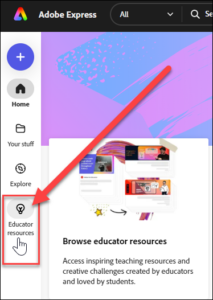
If you are not familiar with Adobe Express, I recommend that you click on Educator Resources on the left. There are lots of great videos, lesson plans, templates and more to help you get started.
NOTE: If you have trouble getting in in Google Chrome, try the Edge Browser or Firefox.