

Built-In Accessibility Tools for everyone! Updated iOS 27 iPad and iPhone Features
Updated iOS 27 iPad and iPhone Accessibility Features
We have updated our Top 10 Built in Accessibility Features Resources for the new Operating System – iOS27! Once turned on, these features work across all iPads/ iPhones in apps, tools, websites and environments as they are part of the settings. Most people don’t realize that these helpful tools exist right in their device.
iPads, iPhones, include powerful accessibility tools built right into the operating system
These features can support a wide range of needs—without requiring additional apps or expensive programs.
Video – I’m Not Remarkable: Apple Products Make School More Accessible – Designed for Every Student

Just some of the tools that are available
Built-in tools can help with reading, writing, vision, hearing, and focus. Some popular features include:
Writing Supports
- Voice to Text (Dictation) – Speak instead of type
- Word Prediction with Hold to Speak – Correct spelling of words suggested
Reading Supports
- Read & Speak – Have content read aloud (4 options)
- High Contrast & Display Settings – Improve visibility and reduce strain
- Text Size & Formatting – Customize how text appears
- Live Captions – Turns Speech into on-screen text
- Guided Access – Lock device to one app
These tools can be easily customized directly on your device. There are many more Accessibility Supports and tools on Apple Devices available, but these are some of the more Universal Supports.
Quick Guide
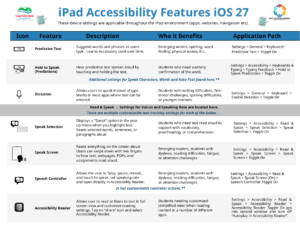
iPad Accessiblity Tools Poster with QR codes to Resources
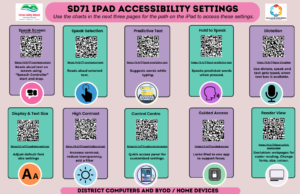
Learn 71 Resources
Explore our Learn 71 quick-reference guides to learn more:
- iPad iOS27 Accessibility Features Quick Guide (Top 10)
- SD71 iPad Accessibility Settings Poster
Apple Resources
- Quickly turn accessibility features on or off on iPhone and iPad – Apple Support (CA)
- Accessibility – Features for Students – Apple
- Accessibility – Apple
- Accessibility – Features – Apple
- How to use the Accessibility Assistant shortcut on iPhone, iPad – Apple Support – Video
Accessibility is about ensuring everyone can access and engage with technology, learning and experiences in ways that work for them. These built-in tools are a great place to start—simple, effective, and already available.
If you have a Tech Tip to share or you would like help with technology, please email us:
 Kara Dawson (she/her/hers)
District Information Technology Support Teacher

 Jane Rondow (she/her/hers)
SD 71 District Inclusion Teacher (Assistive Technology)
