
Tech Tips
  • Home
  • Learn More
  • Menu Menu
Tech Tips

Creating a Password Protected File

Creating a Password Protected File

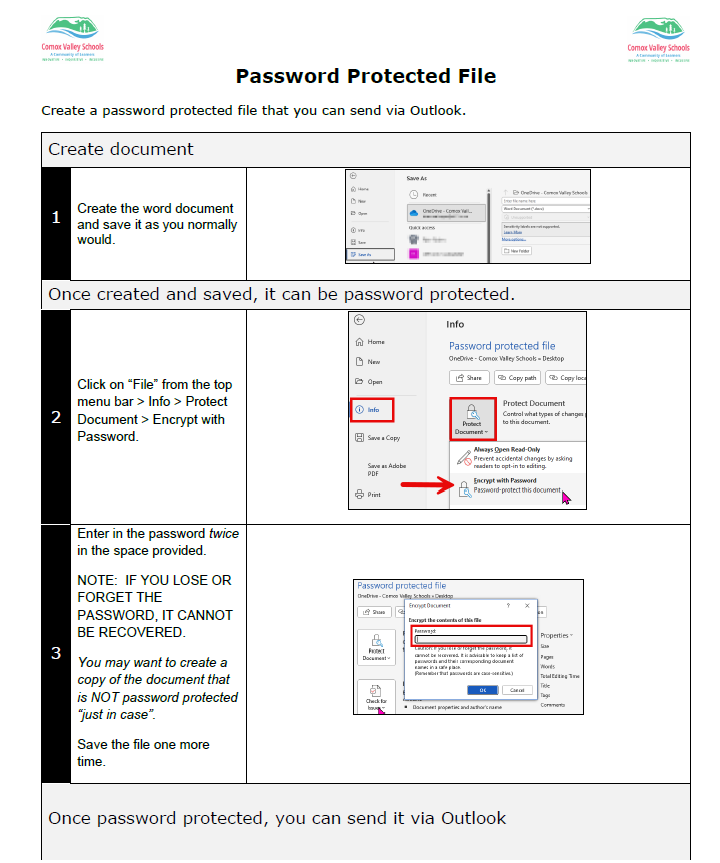
In the age of privacy and security, we need to be very careful how we send confidential information – especially if it contains sensitive student information.  One way to do so, is to create password protected Word or PDF documents that can be sent with a separate email containing the password. 

​Please click on the link below or the image for the full set of instructions on how to do this.  It also includes how to create a Password Protected PDF file from a Word Document.
Password Protected File

July 9, 2026/by admin
Share this entry
  • Share on Facebook
  • Share on X
  • Share on Pinterest
  • Share on LinkedIn
  • Share on Tumblr
  • Share on Vk
  • Share on Reddit
  • Share by Mail
https://learn71.ca/tech-tips/wp-content/uploads/sites/42/2026/07/Tech-Tips-Logo.png 0 0 admin https://learn71.ca/tech-tips/wp-content/uploads/sites/42/2026/07/Tech-Tips-Logo.png admin2026-07-09 10:39:542026-07-09 10:39:54Creating a Password Protected File

Archive

  • July 2026
  • August 2024

Categories

  • Tech Tips

Facebook

Instagram

No images available at the moment

Follow Me!

Footer

Footer 2

Link to: Give Credit Where Credit is Due-How to Cite AI Link to: Give Credit Where Credit is Due-How to Cite AI Give Credit Where Credit is Due-How to Cite AI Link to: Let Copilot in Outlook do the Heavy Lifting Link to: Let Copilot in Outlook do the Heavy Lifting Let Copilot in Outlook do the Heavy Lifting
Scroll to top Scroll to top Scroll to top