Ace your Presentations with Speaker Coach
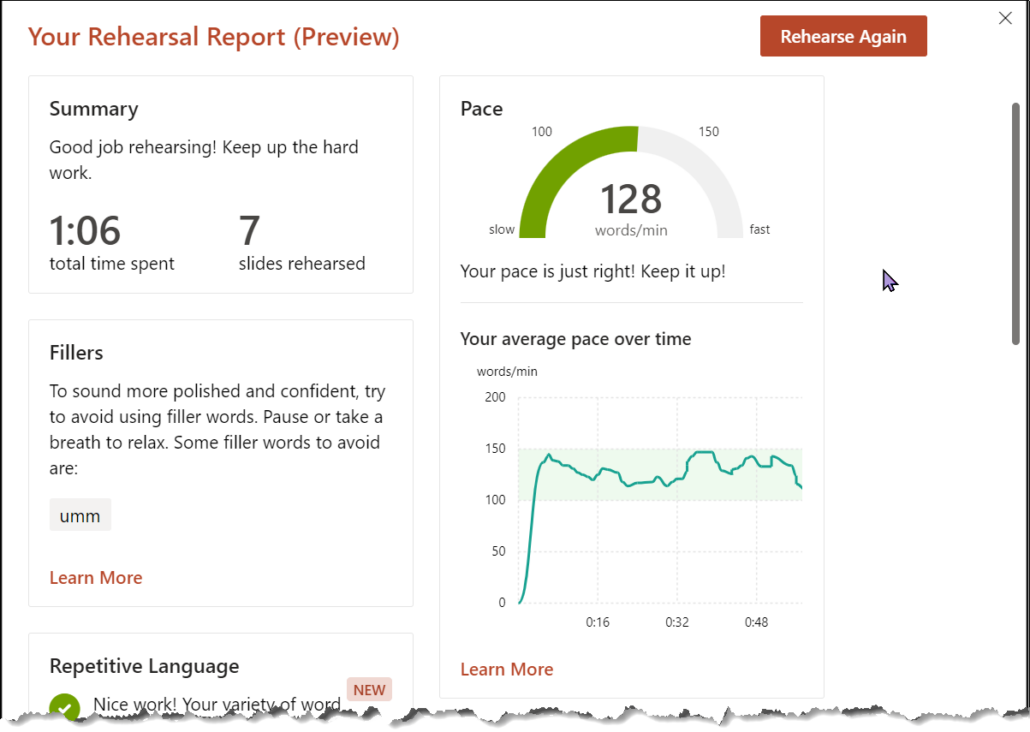
I am doing a presentation at a conference on Friday and like my normal self, I am totally nervous and want to do well. To practice the presentation, I tried out Microsoft’s Speaker Coach in PowerPoint and now I want to share how awesome it is with all of you! I was able to figure out how long my presentation was (too long), how many times I said umm (lots), if my pace sped up and slowed down (yep) and a whole bunch more information about how I present! This is a valuable tool for me, for teachers and for all our students who use PowerPoint. This reminds me, I can also turn on Closed Captioning in PowerPoint when I present and we missed a link in our Tech Tip last week: Captions and Soundfield in the Classroom – Learn71
How to use Speaker Coach:
1. Open your PowerPoint presentation online (it must be the online version)
2. Click on the arrow beside Present at the top right and then click on Rehearse with Coach

3. When you are ready to start, click on Start Rehearsing.

If you leave Show Real-time feedback checked, as you are speaking it encourages you and lets you know what you make mistakes (like saying umm over and over).
4. When you finish presenting, press end or escape to get out of presenter view and you will see your results. Make sure you scroll down to see them all! There are a whole bunch of new areas of data you can see like if words were repeated, pronounced correctly and if your language was inclusive.