
A Fun History Game and How to Change the Size and Colour of Your Mouse Cursor
Today I can’t resist sharing the history game I found. History buffs and history teachers will love timeguessr.com where you are given a picture, and you try to guess the location and year it was taken.
Jane Rondow, our wonderful SD 71 District Inclusion Teacher (Assistive Technology), has written this week’s text tip on how to change your cursor and the size of your mouse pointer.
Are you using your computer to present, show people how to do things, point out things on websites, do an online meeting or make a how-to video? Draw attention to the things you are showing by enlarging your mouse cursor. This can also be helpful for people with visual Impairments, processing needs or anyone really.
Windows Computer :
1. Tap the Windows key
2. Type “Ease of Access Settings” select this menu option.
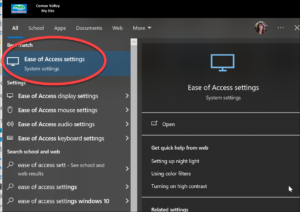
3. Select Mouse Pointer from the menu on the left.
4. Slide the change pointer size slider to the right to make it bigger, to the left to make it smaller.
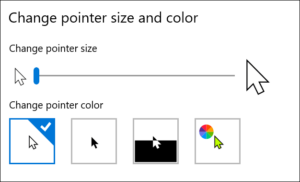
5. Select the pointer colour and contrast
6. If you select the far-right colourful option, you can choose any colour, + Pick a custom pointer colour
*Selecting a High Contrast option like yellow (with a black outline) or black makes the cursor easier for people with low vision needs to see the cursor. Doing small circles with the cursor around or near the area you would like people to focus on helps to gain attention to that area.
LINK Windows Make your Mouse, Keyboard or Other Input Devices Easier to Use
LINK Mac Computer Make the Pointer Easier to see on a Mac