Light the Torch! Fun Olympics Resources + Canva Classroom How‑To’s
I don’t know if there are any other crazy excited Winter Olympics fans out there but I can’t wait to start cheering on Cassie Sharpe and watching our other amazing athletes! To help you and your students follow along, we have started putting together some links to the Olympics, with printables and other fun information to help build momentum. You can find the link under the big buttons on the front of Learn71.ca. Please reach out to us if you know of any other good sites! We have also recently been trying out the Canva Classroom and I am happy to share some tips for finding the awesome teacher lesson plans available there and how to set your class up and assign work in Canva. Thank you Karla for your help with this 😊
Where are the lesson plans in Canva?
You can find full lesson plans with slide presentations and activities for most subjects and grades in Canva. You can use pages from them or the whole unit and you can edit and assign the lessons to your class. The Magic Activity button is also amazing for creating activities for your class. Here’s how to find them:
1. Log into Canva using your Comox Valley School District email address and password. You can find a link to Canva in My Apps.
2. Click on Education on the Home page.
3. Beside Education Templates, click on See All
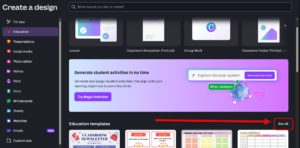
Now you can see the Categories of the lesson plans and filter by Subject, Grade and Resource Type. We also encourage you to try out the Magic activities.
How can I assign this to my class in Canva?
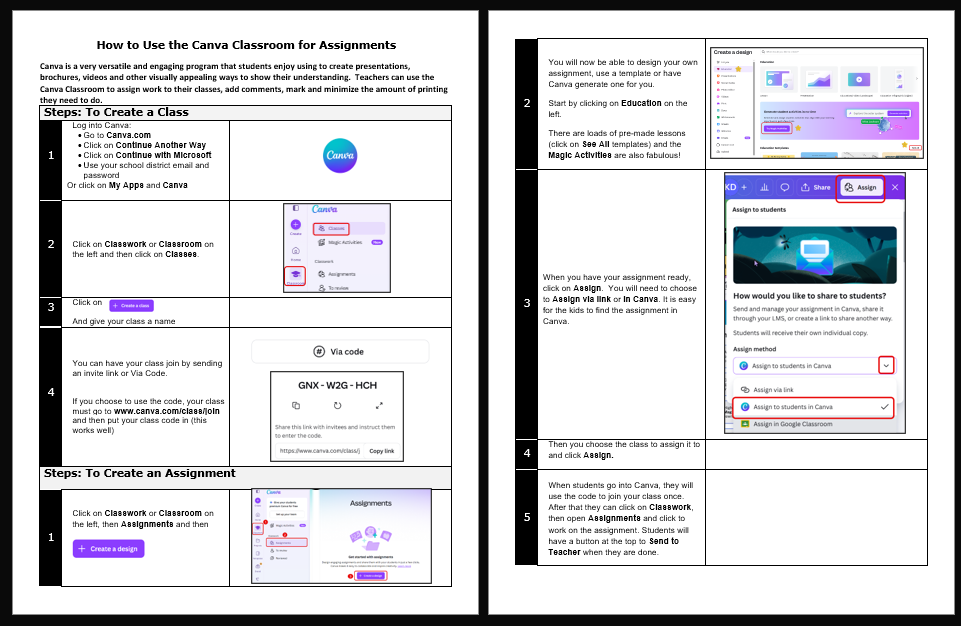
You can download the lessons and use them as you would like or you can use the Canva Classroom (also called Classwork). Every time I go in to find lessons I find more incredible things!
Here are some instructions to help you get started: