
Creating Lessons in the Age of AI
🤖 Practical strategies, activities and ready-to-use tools to help educators design meaningful learning experiences in the Age of AI.
KEY TAKE AWAYS
Redesign Assessments
Create learning experiences where AI cannot easily replace student thinking.
Teach Responsible Use
Help students use AI appropriately, transparently and ethically.
Focus on Thinking
Make student thinking visible through process, reflection and discussion.
Designing “AI-Proof” Assignments

Practical strategies to make student thinking visible and more difficult to outsource to AI

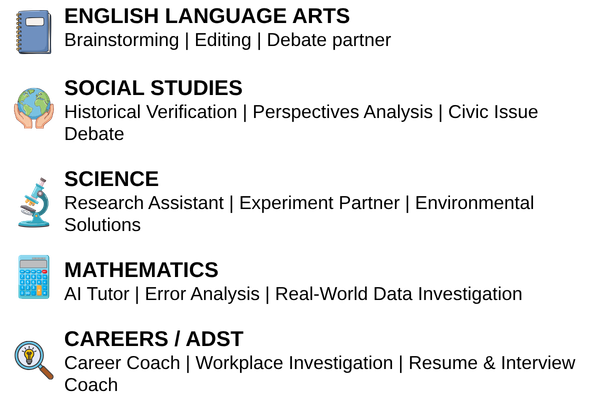
Activities Where AI is Intentionally Used

Subject-specific ideas for using AI as a thinking partner.
.
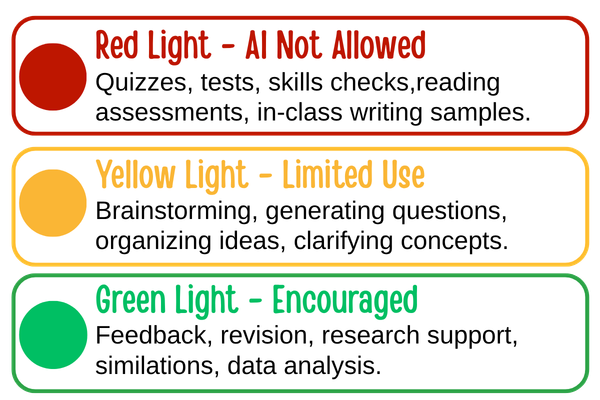
Traffic Light AI Use Framework

Clear expectations help students know when and how to use AI correctly
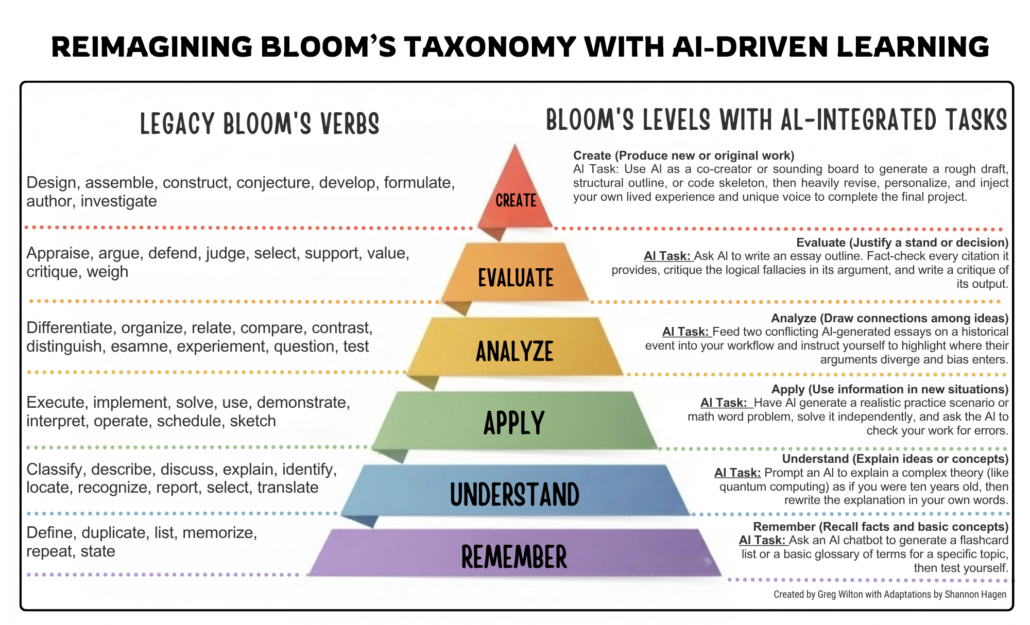
REIMAGINING BLOOM’S TAXONOMY WITH AI-DRIVEN LEARNING
Bloom’s Taxonomy provides a hierarchical framework for learning, and generative artificial intelligence (GenAI) shifts how students and educators approach each cognitive level.
Click on the image to enlarge it and open a copy to download. Then view what AI-specific tasks can be completed at each hierarchical level.
🔗 8 Ways to create AI-Proof Writing Prompts
- Strategies for writing AI-proof prompts to use in your classes.
🔗 Narrative Agency and Strengthening Student Voice in the Age of AI
- Finding First Person: Telling My Story in the Age of AI, is curriculum designed to build “narrative agency”. The curriculum is developed by KQED Education.
🔗 UNESCO: Guidance for Generative AI in Education and Research
- UNESCO’s framework explores the opportunities, risks, ethics, privacy considerations, and educational implications of generative AI. It emphasizes human-centered, safe, and responsible AI use in teaching and learning.
- Provides role-specific roadmaps for teachers, school leaders, and district administrators on developing AI literacy, classroom expectations, and responsible AI practices.
🔗 Edutopia: Stoplight Model for AI Use
- Introduces the Red-Light, Yellow-Light, Green-Light framework to help teachers clearly communicate when AI is prohibited, limited, or encouraged for learning activities and assessments.
🔗 The Real Way to Stop Cheating in an AI World
- Blog post written by Richard Culatta (CEO of ISTE) commenting on: “As AI use in schools grows, educators may need to reassess their presumptions on what causes cheating and how it can be addressed.”
- Provides ways to move away from cheating with AI by asking two questions: “What are we asking students to do, and is it actually worth doing?”
🔗 I Used AI to Build AI-Resistant Assignments
- How Michael Hernandez used Vibe Coding to create a “Cheat Vulnerability Index” app for teachers to use to determine “How cheat-resistant their assignments are”. Use the link above to upload your own assignment to “test it out”.
🔗 10 Ways to Detect AI Writing Without Technology
- Recognize AI-generated work students have submitted without using an AI detector.
- Provides a collaborative activity where students and teachers co-create AI-use expectations using a stoplight model, encouraging discussion, reflection, and shared understanding.
🔗 Assessment Redesign for Generative AI
- Highlights practical strategies for redesigning assignments that make student thinking visible, reduce reliance on AI-generated products, and encourage authentic demonstrations of learning.
This page was developed and created with the help of AI.