
Finding Time with Scheduling Poll and Some AI Lessons
We all have such busy lives, it can be super hard to find time to schedule a meeting with a coworker. To help make this easier, Microsoft has built Scheduling Poll (used to be called Find Time) right into Outlook email. Instead of endlessly writing back and forth to get a perfect time, try this easy solution. Thank you, Sandra, for suggesting this Tech Tip 😊 Please read on for how to use Scheduling Poll and some Ministry of Education AI Lessons for your classes!
How to use Scheduling Poll:
- Open a New Email: Start by creating a new email to send to your group. You need to have the names in the “To:” section for this to work.
- Insert the Scheduling Poll: Click on the “Message” tab, then click in the body of your email and choose Scheduling Poll at the top.
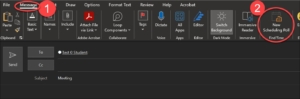
- The Scheduling Poll appears on the right side of your screen.
- Select Meeting Times: Select the duration of the meeting and the date of the meeting then choose meeting times. If your coworkers use the Outlook Calendar, it will show if they are busy or not. You can change the date and select options on different days. Choose several options that you think will work for everyone.
- Click Next: Then you can enter the location or leave it as a Teams meeting.
- Click Create Poll: It will add a graphic to your email.
- Send the Poll: Send the email. The recipients will get a link to the poll where they can vote on the times they’re available.
- Check the Results: You’ll be notified as people respond, and you can view the results to easily see which time works best for the majority.
Some AI Lesson ideas to use with your classes:
The Ministry of Education has been collecting stories of how teachers in BC are using AI with their classes. Click on these links to read the stories and get ideas for lessons:
- ADST 3-5 Teaching and Learning Story – What is AI, How can we use it and What should we look out for (PDF, 501KB)
- ADST 8 Teaching and Learning Story – What is AI and the Ethical Use of AI (PDF, 1.6MB)
- ADST 12 Teaching and Learning Story – Digital Email Marketing with AI Content (PDF, 764KB)
- Anatomy and Physiology 12 Teaching and Learning Story – Heart Diagram (PDF, 391KB)
- Arts Education 10-12 Teaching and Learning Story – Redesign for Reconciliation (PDF, 1.2MB)
- Arts Education and ELA 10-12 Teaching and Learning Story – Integrating AI Into the Arts (PDF, 1.3MB)
- BCFP 12 Teaching and Learning Story – Ethics of Generating AI Images of BC First Peoples and Local Indigenous Art (PDF, 857KB)
- ELA 9 Teaching and Learning Story – AI Stories – The good, the bad, and the hallucination (PDF, 346KB)
- Math 9 Teaching and Learning Story – Exploring AI and Dodging Bias (PDF, 395KB)
- Media Design 10 Teaching and Learning Story – Discerning Bias in AI Text Generated Images (PDF, 1.44MB)
- Science 3-4 Teaching and Learning Story – Exploring The Motions of the Earth, Moon and Sun (PDF, 680KB)
- Social Studies 4-5 Teaching and Learning Story – Can AI Help us Write Land Acknowledgments (PDF, 550KB)
- Web Development 10 Teaching and Learning Story – Website Development Unit Accelerated with AI Content (PDF, 967KB)
- More Teaching and Learning Stories are coming soon
These and more Ministry of Education AI information can be found here: