
Tech Tips
  • Home
  • Learn More
  • Menu Menu
Tech Tips

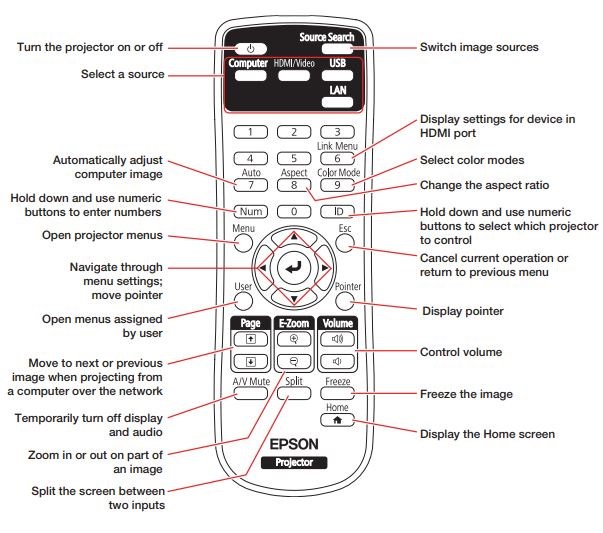
Freeze, AV Mute and other Cool Things to do with Your Epson Remote

​​Most teachers now have some kind of projector (Brightlink/Smartboard)  in their classroom and they all seem to come with the same remote.  I just discovered some cool things that you can do with it and of course, I wanted to share!

Freeze – Press the Freeze button to freeze the image on the screen. Then you can use your computer to do your own work while leaving the screen frozen on what your class needs to see.

AV​ Mute – Temporarily turn off the display video and audio. I’ve noticed that lots of teachers use this feature to save the light bulb without having to turn the machine off and then on again in a few minutes when you need it again.

Display Pointer – Pressing this puts an arrow on the screen that you can control using the arrow buttons on the remote.

Page Up and Down buttons – These can be used to move through slides in your PowerPoint or other slide presentation.  This only works if you are not using a pen: ​Click here for more information.​

Here is a picture that explains what all the buttons do:
From: https://nerdtechy.com/epson-powerlite-l500w-review​ ​

July 9, 2026/by admin
Share this entry
  • Share on Facebook
  • Share on X
  • Share on Pinterest
  • Share on LinkedIn
  • Share on Tumblr
  • Share on Vk
  • Share on Reddit
  • Share by Mail
https://learn71.ca/tech-tips/wp-content/uploads/sites/42/2026/07/Tech-Tips-Logo.png 0 0 admin https://learn71.ca/tech-tips/wp-content/uploads/sites/42/2026/07/Tech-Tips-Logo.png admin2026-07-09 09:42:002026-07-09 09:42:00Freeze, AV Mute and other Cool Things to do with Your Epson Remote

Archive

  • July 2026
  • August 2024

Categories

  • Tech Tips

Facebook

Instagram

No images available at the moment

Follow Me!

Footer

Footer 2

Link to: A Picture is Worth a Thousand Words Link to: A Picture is Worth a Thousand Words A Picture is Worth a Thousand Words Link to: Teams Files in File Explorer on Your Computer Link to: Teams Files in File Explorer on Your Computer Teams Files in File Explorer on Your Computer
Scroll to top Scroll to top Scroll to top