
Tech Tips
  • Home
  • Learn More
  • Menu Menu
Tech Tips

A Picture is Worth a Thousand Words

A picture is worth a thousand words! We are posting pictures and using images that we find online everyday to enhance our multimedia presentations. It is important to teach students to respect copyright and the work that people post on line.  Students should be encouraged to use images that are licensed as Creative Commons or public domain.  

To find these type of images in Google Chrome, follow these steps:
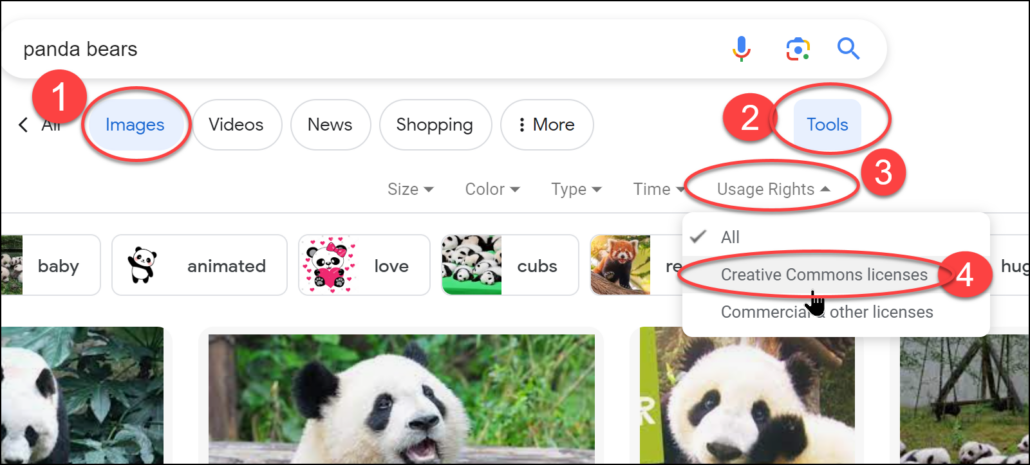
1. Type your topic into Google
2. Click on Images
3. Click on Tools
4. Click on Usage Rights
5. Click on Creative Commons License (this ensure that you are using images that are permitted by the person who put the image online)
​What does Creative Commons Mean?  Watch this video to learn:
There are also many sites out there that offer Creative commons images free for your use.  This article contains links to many of the free image sites:

18 Free Image Sites and Tools for Schools​

I usually check them before using the pictures because some of them would like you to put a link to their site.

Some good guidelines for using online images:

1.Give the creator of the images credit for their work (put the link from where you got the picture-you may need to actually visit the site that the picture is from as it is not acceptable to give a link to Google Images).

2. Get the pictures from a place that is designed for pictures to be shared (for example, Pi​xabay).

3.  Use pictures at are licensed Creative Commons.

July 9, 2026/by admin
Share this entry
  • Share on Facebook
  • Share on X
  • Share on Pinterest
  • Share on LinkedIn
  • Share on Tumblr
  • Share on Vk
  • Share on Reddit
  • Share by Mail
https://learn71.ca/tech-tips/wp-content/uploads/sites/42/2026/07/Tech-Tips-Logo.png 0 0 admin https://learn71.ca/tech-tips/wp-content/uploads/sites/42/2026/07/Tech-Tips-Logo.png admin2026-07-09 09:41:052026-07-09 09:41:05A Picture is Worth a Thousand Words

Archive

  • July 2026
  • August 2024

Categories

  • Tech Tips

Facebook

Instagram

No images available at the moment

Follow Me!

Footer

Footer 2

Link to: How to ChatGPT Proof Your Assignments Link to: How to ChatGPT Proof Your Assignments How to ChatGPT Proof Your Assignments Link to: Freeze, AV Mute and other Cool Things to do with Your Epson Remote Link to: Freeze, AV Mute and other Cool Things to do with Your Epson Remote Freeze, AV Mute and other Cool Things to do with Your Epson Remote
Scroll to top Scroll to top Scroll to top