How to Create an E-Mail Group/ List
One really handy thing to do when you are working with a group of people is to set up an email list or group. I didn’t realize that there was a difference between the two and I admit I had to learn a bit to get today’s Tech Tip ready. Read on to learn the difference and find some instructions to help (thank you Julie for this awesome Tech Tip idea). Oh and don’t forget to check out the fun Halloween links that I have updated for this season: Click here for Halloween Fun
Difference Between a Group and a List:
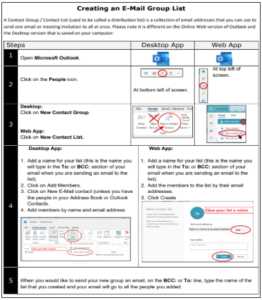
An email Contact List/ Contact Group (used to be called a Distribution List) is a collection of email addresses that you can use to send one email or meeting invitation to all at once. To confuse us, , Microsoft calls this a Contact List when you are working in the online web app but if you are on your desktop app on your computer it is a Contact Group.
An email Group is a collection of people (entered by email address) that get an email address for conversations, a space for shared files, a group calendar and more. It is a bit like a Team.
If you just want an easy way to send a group of people emails and meeting invitations, the Group list is the best choice. If you have a group that you would like to plan with and work together, a Group is better.
How to Create a Group List/ Contact Group