
Tame Your Inbox with Categories, Flags & Archives
As we approach June and the weather is beautiful, we sometimes need some quick ideas to regroup our students and shift gears or calm down. Check out Digital Snacks – 150+ Breaks for students’ brains, curated by Tony Vincent to find relaxing break videos, sensory break videos and quick activities like “Do nothing for 2 minutes”.
…and on another note…
If your Outlook inbox feels a bit like a laundry basket full of emails, meetings, reminders, and “I’ll deal with this later” messages… you’re definitely not alone 😅
Luckily, Outlook has a few simple tools that can make a huge difference without creating complicated folders or systems.
Luckily, Outlook has a few simple tools that can make a huge difference without creating complicated folders or systems.
🎨 Use Categories to Organize Visually
Categories let you add colour labels to emails so you can quickly spot important messages.
You could create categories like:
- 🔵 Staff
- 🟢 Parents
- 🟣 Tech Tips 😉
- 🟠 Urgent
- 🟡 To Read Later
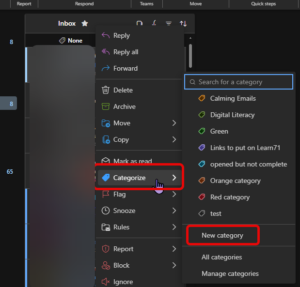
👉 Right-click an email → Categorize → choose a colour or click on New category and set one up.
🚩 Flag Emails You Need to Return To
Instead of leaving emails unread forever, try using Flags.
Click the little 🚩 beside an email to mark it as something you need to follow up on later.
This works great for:
- emails you don’t want to forget to read later
- people to reply to
- tasks you can’t do immediately
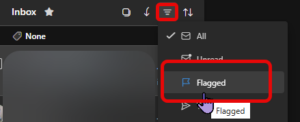
You can even sort your email to show just all the flagged ones:
Even spending just 2 minutes at the end of the day categorizing, flagging, or archiving can make Outlook feel much calmer and easier to manage.