Reflecting in Teams and Tips for Using Computers with the Littles
One great way to get a good feel for how your students are doing is to use the Reflect options in Teams on a regular basis. It is anonymous to the students and it is a safe, fun way to ask them how they are doing (thanks to Tracy, one of our fabulous Teacher Librarians for this idea). Read on to learn more about Teams Reflect and to get some tips for primary teachers using computers with their students.
Tips for Using Computers with Primary Students:
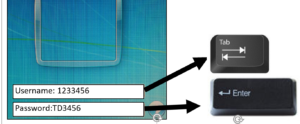
1. Give your students a card that contains their username and password. Click here to open one that you can use. I recommend filling them out in upper case because that is what they will see on the keyboard.
2. Teach them how to take care of computers and proper behaviour when they are using them. You can use this responsible use agreement: SD#71 Primary Responsible Use Agreement
3. Show them what they are doing before they get on the computer then show them again when they open up the computers.
4. Start slow. Many will have never used a mouse (but may be familiar with a touch screen). Let them try some games that teach mouse skills: abcyaSkills – Many of these games are designed just to help kids learn how to click and drag.
5. Start a Typing Program. This will also help students with letter recognition. Click here for instructions to help you use Typing Pal
6. You could introduce word processing Click here to read an article with ideas or click here for some lessons to help you
7. Have a signal to get student’s attention and get their hands off of the computers. For example you can have them put their hands on their heads or cross their arms and then you can see that they are not using their computers. Some teachers have the students turn the laptop around or put the screen at “Half Mast” (half way down not closed which would turn the computer off).
8. Teach your class Internet Safety. Here are some great sites to help you: Digital Citizenship for Primary Classes
9. Teach them how to create folders, save files and keep those files organized.Click here for help with this.
10. Use the computer to teach research skills: Click here for some help with this.
Using Reflect in Teams:
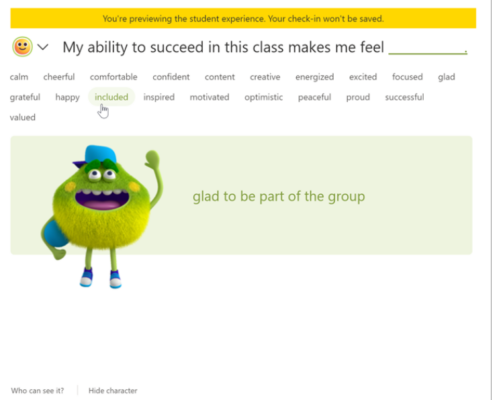
This is an extension in TEAMs that may help students recognize and navigate their emotions by providing regular opportunities to share and be heard. Reflect is a great way to help students think about their feelings and reflect on what you are doing in class. Teachers can keep the responses anonymous so students will never know who each response is from.
Click here for instructions for how to use Reflect.